For building managers and residents

Book shared spaces
without the fight over time slots.

Courts, party rooms and EV chargers with your building's own rules: prime time, a waitlist and a fair draw when the schedule opens. Residents book from their phone or their computer.

Free for small condominiums · Ready in minutes · Português, English, Español

app.revezai.com.br
18:42:07A
Next week's schedule opens in02:13:45
Monday, October 261
17:30Book
219:00Ana Souza (Apt 301)Booked on 10/25, 12:00:04
20:30Your bookingBooked on 10/25, 12:00:09
Tuesday, October 271
17:30Bruno Lima (Apt 302)Booked on 10/25, 12:00:31
19:00Book
19:00Your bookingBooked on 10/25, 12:00:52
Event20:30Carla Dias (Apt 1201)Booked on 10/25, 12:00:18
Wednesday, October 28
17:30Book
19:00Enter the draw4 interested
20:30Unavailable · Court maintenance
Thursday, October 29
17:30Book
19:00Book
20:30Diego Rocha (Apt 702)Booked on 10/25, 12:00:44
Slot booked!
Hi, Ana!A

What would you like to do?

Book the CourtPick a time to playMy BookingsSee your booked slots
My waitlistCourt rules

One schedule for every shared space

Courts of every kind, party room, barbecue area, pool, gym and EV charger: each space with its own rules, in the same app.

  • Tennis court
  • Padel and beach tennis
  • Football pitch
  • Basketball
  • Volleyball
  • Multi-sport court
  • Party room
  • Barbecue area
  • Gourmet space
  • Pool
  • Gym
  • EV charger
  • Meeting room
How it works

From sign-up to the first booking
in a few minutes.

01

Register the building

Name, city and the units, generated floor by floor or pasted from a list.

02

Turn on the spaces

Court, party room, EV charger: each with its own name, hours and rules.

03

Set the rules

Start from a ready-made template and change anything: prime time, the limit per unit, when the schedule opens.

04

Invite the residents

A link and a QR code for the group chat and the elevator. Each resident picks their unit and the manager approves.

Schedule

The whole week,
on one screen.

One day per column, easy to read at a glance. On a computer the whole week fits. On a phone, just swipe sideways.

  • Prime time marked with a gold stripe
  • Your booking in green, with the cancel button right beside it
  • Join the waitlist with one tap and see everyone's place
  • A compact layout to see every slot at once
  • A countdown to the opening, in sync with the server
app.revezai.com.br
09:14:30A
Friday, October 301
13:00Unavailable
14:30Book
16:00Book
17:30
19:00
20:30Yours
Saturday, October 31
13:00
14:30
16:002
Waitlist
  • 1º – Carla Dias (Apt 1201)
  • 2º – Diego Rocha (Apt 702)
  • 3º – You (Apt 301)
17:30Book
19:00
20:30Book
Sunday, November 11
13:00Book
14:30
16:00Book
17:30Book
19:00Yours
20:30Book
Features

Everything a building needs
to book without arguments.

Rules already proven in a real building's daily life, ready for yours and adjustable for each space.

Prime time

Say which slots are the most wanted on each day of the week and on holidays, and how many each unit may hold.

17:30
19:00Prime
20:30Prime
Saturdays and holidaysAll day

An automatic waitlist

Someone cancelled? The slot goes by itself to the first person in line who can take it, and they get notified.

Bruno cancelled Friday, 19:00
1ºCarla Dias (Apt 1201)got the slot
2ºDiego Rocha (Apt 702)
3ºYou (Apt 301)

A draw at the opening

In the first minutes after the schedule opens, picking a slot enters you in a draw. With one person interested, the slot is theirs. With several, a recorded draw anyone can check decides.

The draw closes in00:04:12
Friday, 19:00
5 interested
Enter

Recorded seed: 8f3a…c21 · result anyone can check

Your rules, your way

Turn things on, off and fine-tune them without calling anyone.

Prime time
Waitlist
Manager approval
Back-to-back slots−2+

Reports

Use by day, the most wanted slots and cancellations per unit.

Events

Several back-to-back slots for a party or a tournament, with approval and a yearly limit per unit.

EventDoubles tournament · Apt 802Saturday, 14:30 to 19:00
Approved

Three languages

Portuguese, English and Spanish, on screen and in the emails. Each resident picks theirs.

PTOlá!ENHello!ES¡Hola!

Email notifications

A slot freed up, a place in line, a draw result, an approved sign-up: everyone hears about it right away.

The slot is yoursRevezaí
Friday, October 30, at 19:00. You were first in line and the booking is already in your name.
See my bookings

On iPhone, Android and the computer

On iPhone, the app. On other devices, the site opens fast and installs on the home screen. On the computer, the whole week fits on the screen.

iPhone app

Your slot in two taps,
in the iPhone app.

Residents book, cancel and join the waitlist in the app. The manager approves sign-ups, posts notices and closes a space for maintenance without opening the computer.
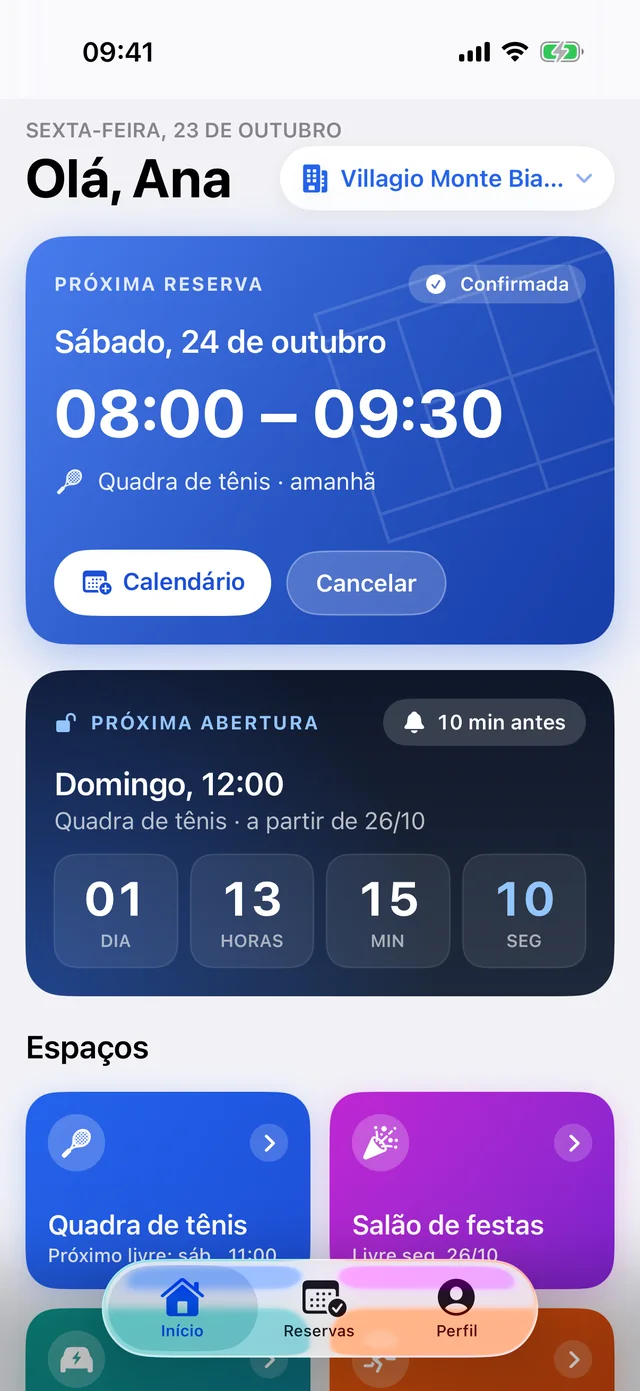
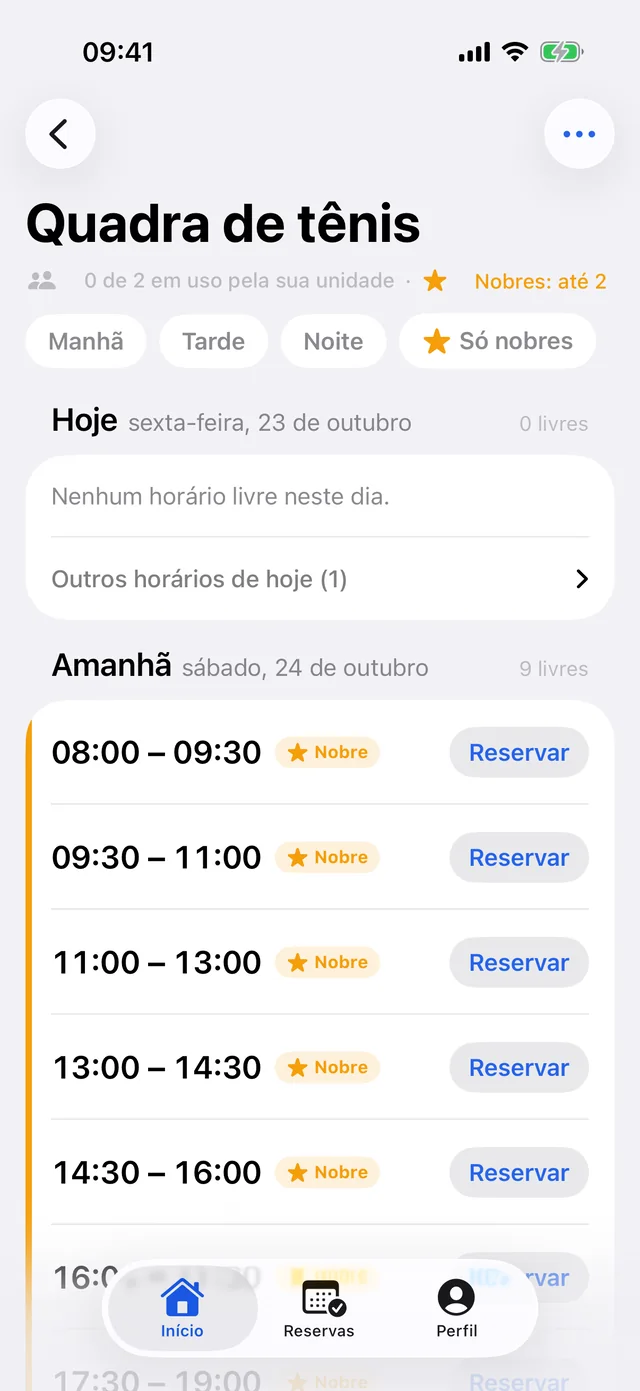
Coming soon to the App StoreOn Android and on the computer, Revezaí opens in the browser.
App home screen with the next booking and the countdown to the schedule opening
Your next booking on the home screen
Tennis court schedule in the app, with free slots and the Book button
The space's schedule
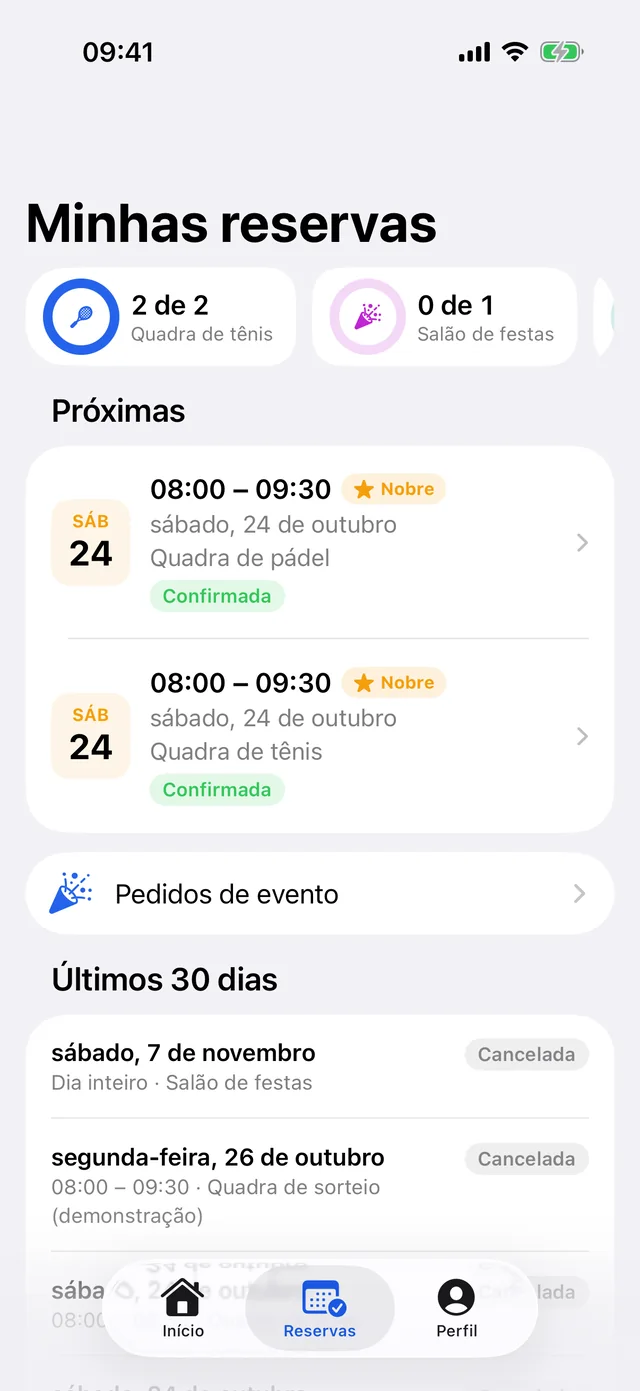
My bookings screen with upcoming bookings and the use of each space
Your bookings and waitlists
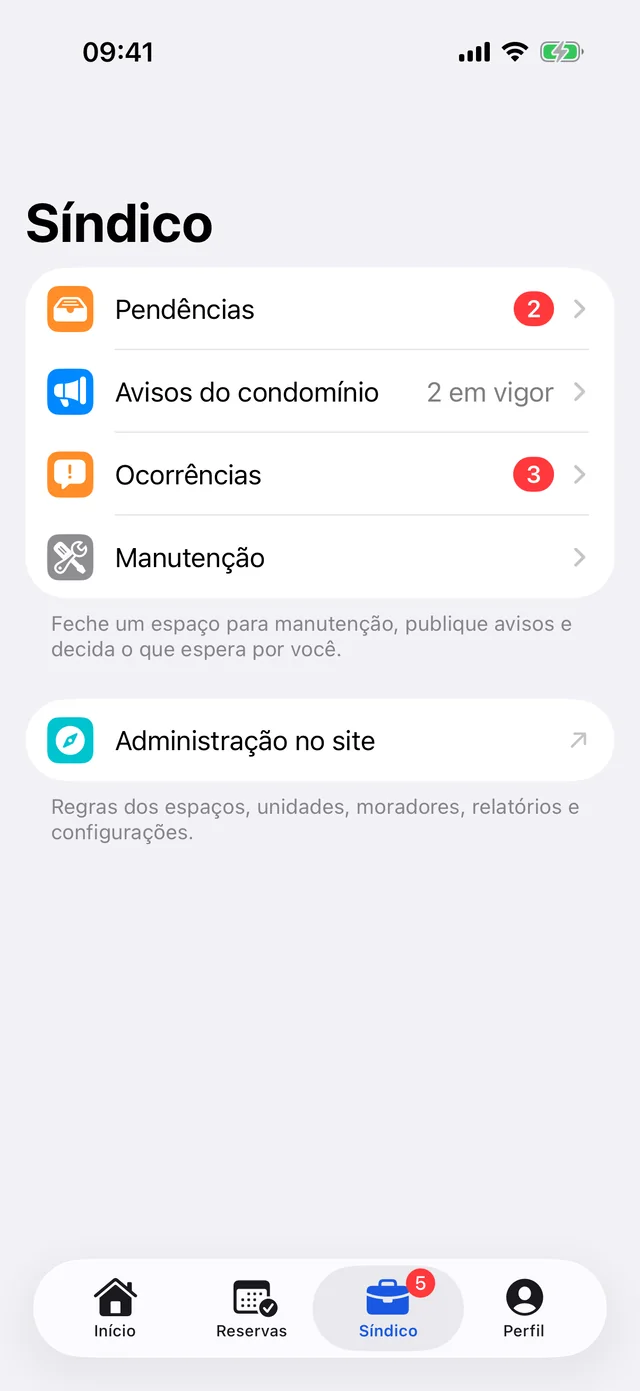
Manager panel in the app with pending items, notices, occurrences and maintenance
The manager decides in the app
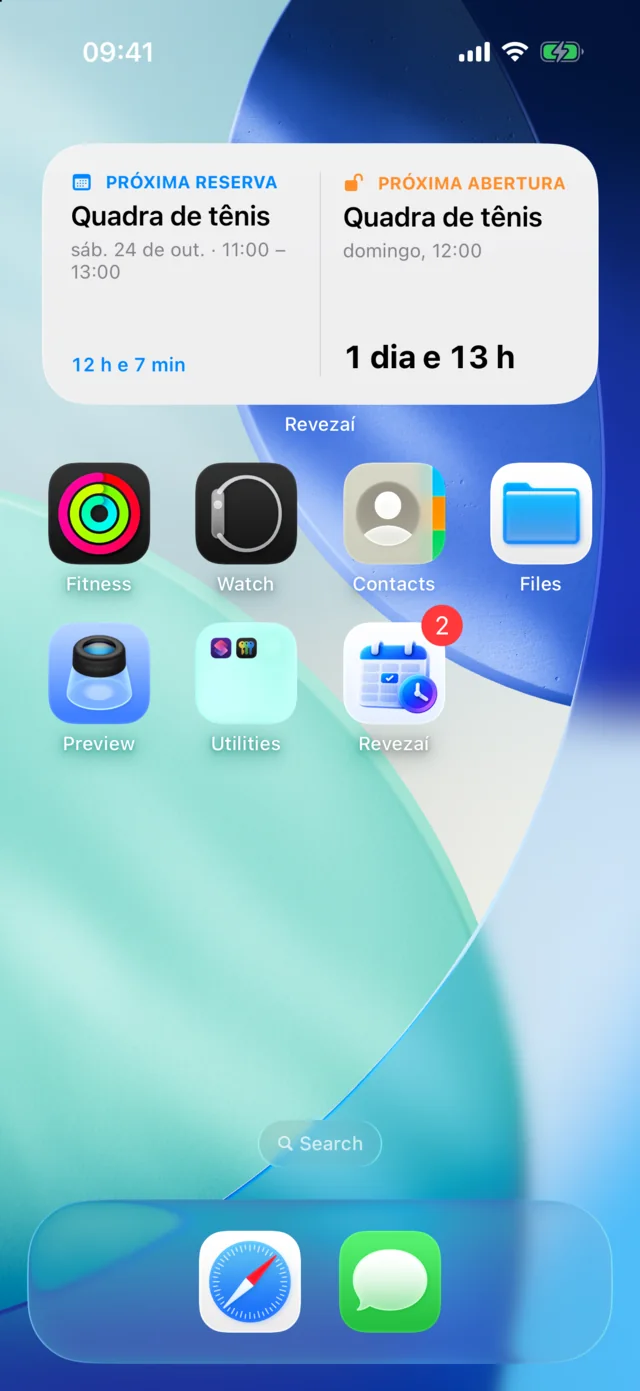
Revezaí widget on the iPhone home screen with the next booking and the next opening
Home screen widget
  • A reminder before your slot, with a button to release it
  • The countdown to the schedule opening on the lock screen
  • A widget with your next booking and the next opening
  • Instant alerts for the waitlist, the draw and the manager's notices
  • Up for a game, to find a partner in the building
  • Portuguese, English and Spanish, with dark mode
Settings

Rules the manager
changes on their own.

What used to sit in the printed house rules becomes settings: turn on, turn off, adjust, save. The residents' rules page writes itself from them.

  • Each day's hours, prime time and holidays
  • How many active bookings each unit may hold
  • Back-to-back slots: don't allow, just warn, or allow up to how many
  • The schedule opening, on a set day and time
  • Events per unit per year, with approval
app.revezai.com.br
A

Settings · Tennis court

Changes apply to upcoming bookings, and residents see a notice about the new rules.

Prime timeMonday to Friday from 7 pm, Saturdays and holidays
Back-to-back slotsCan the same unit book slots right after each other?Don't allowJust warnUp to 2 in a row
Active bookings per unitCounting the waitlist and draws23bookings
Events per unit per yearUp to 3 back-to-back slots, with approval2events
Save
Rules saved. Residents will see the notice.
Reports

Numbers ready
for the residents' meeting.

See how each space is really used and bring the numbers to the meeting, no spreadsheet needed.

  • Use by day of the week
  • The most wanted slots
  • Bookings and cancellations week by week
  • Cancellations per unit, from most to least
  • Comparison with the previous period and CSV export
app.revezai.com.br
A

Reports and Statistics

Last 30 daysCompare with the previous period
Use by dayPopular slotsBookings and cancellationsBy unit
Use rate by day of the week
100%75%50%25%0%38%52%61%58%64%71%86%
Total bookings214+12% vs previous
Cancellations23−8% vs previous
Average cancellation rate10%−2 p.p. vs previous
Up for a game

Get residents
playing together.

On the schedule, every free slot gets one more button: up for a game. Neighbors see who is looking for a partner and each one's level, and join with a tap. Once it is on, Revezaí books the slot by itself.

  • Only slots that are still free show up
  • Levels from 1st to 5th class, as in clubs
  • The slot is booked when the game is on
  • New residents find a partner in the building
  • The court that used to sit empty gets played
app.revezai.com.br
A
Free slots onlyTennis3rd to 4th class
Friday, October 30
16:00Up for a game
17:30CDClass 4Play
19:00Up for a game
20:30Up for a game
22:00Up for a game
Saturday, October 31
08:00BSClass 3Play
09:30Your request2 requests
11:00Up for a game
16:00YAMGame on
17:30Up for a game
Sunday, November 1
08:00Up for a game
09:30DRClass 2Play
Diego Rocha (Apt 702)

Class 2 · Easy rally, no score

Play together
11:00Up for a game
14:30Up for a game
16:00Up for a game
Origin

Born on a real
tennis court.

Revezaí started as the booking app for the tennis court at Condomínio Villagio Monte Bianco, in Porto Alegre, Brazil. Its residents have already made more than 1,800 bookings through the app.

Every argument over a time slot became a rule: prime time, the waitlist, the draw at the opening. Now those rules work for any building, and each one adjusts its own.
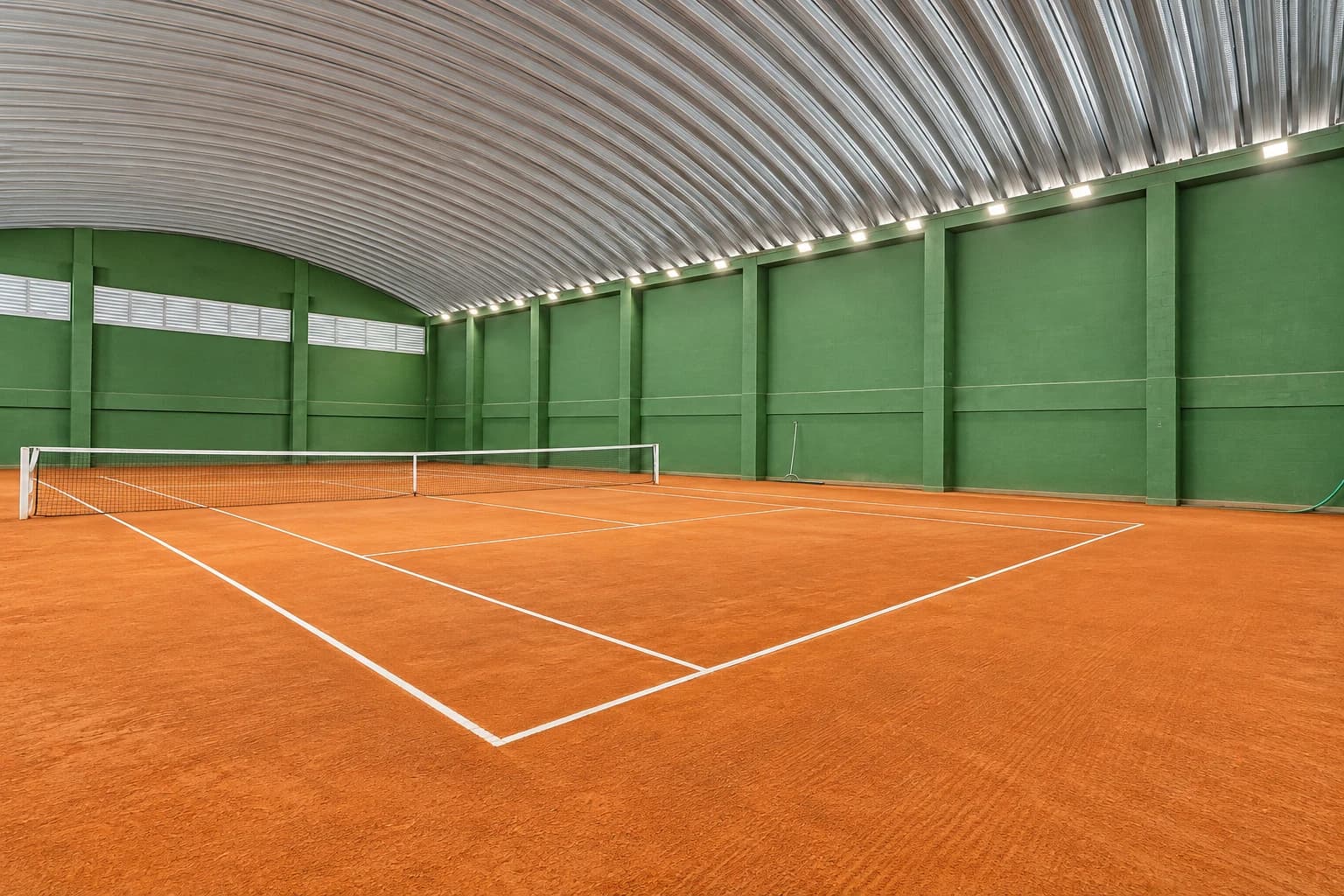
The covered clay tennis court at Villagio Monte Bianco, with green walls
The tennis court at Villagio Monte Bianco
1,800+bookings made on Villagio's court
Porto Alegrewhere Revezaí was born
3languages: Portuguese, English and Spanish
Pricing

A plan for every
size of condominium.

Start free with one space. When the condominium grows, the plan grows with it. Every rule comes with every plan.

Free

For small condominiums and for trying it out.

R$ 0No credit card

  • 1 space
  • Up to 30 units
  • 1 admin
  • Setup with the wizard
Start free

Club

For club condominiums, with many courts and residents.

R$ 399/monthor R$ 3,990 a year (2 months free)

  • Unlimited spaces
  • Up to 600 units
  • Unlimited admins and management companies
  • Full reports and CSV
  • The condominium's own color
  • Setup done by us and priority support
Talk to us

More than 600 units, towers with their own management, or a management company with several condominiums? Talk to us for a tailored plan. Talk to us

See the plans in detail →

Start today. In a few minutes.

Register the building, send the link to the residents and the schedule is live.

Start free · No credit card